Shared facility booking for dormitories and vacation rentals
Guest rooms, BBQ areas, saunas.
Book every shared facility with one QR code.
A booking system for shared facilities in employee and student dormitories, vacation rentals (minpaku) and share houses. Residents and guests book from their phones 24/7, in their own language. No more conflicts or late-night questions, even when no manager is on site.
- Guest rooms
- Meeting rooms
- BBQ
- Sauna
- Parking
- Study rooms
- Music rooms
- Theater room
- Private kitchen use
にほんごEnglishTiếng ViệtBahasa Indonesiaမြန်မာ中文नेपाली
Per property$29/month(excl. tax, flat rate · $290/year if paid yearly)
For dormitories and vacation rentals alike
For shared facilities that need booking, used by people who live or stay at your property. We do not handle room or lodging reservations.
Dormitories
Employee, student and foreign worker dormitories (operators, HR and general affairs teams, dormitory management contractors, schools)
- • Guest rooms (family visits)
- • Meeting rooms, study rooms, music rooms
- • Private use of kitchens and dining halls
- • Parking and visitor parking
Vacation rentals, guesthouses, share houses & monthly rentals
Hosts, management agencies and share house operators
- • BBQ areas, gardens, rooftop terraces
- • Saunas and private baths
- • Theater rooms and workspaces
- • Parking, EV charging, bicycles
Solve everyday problems on site with bookings
Night-time and unstaffed operation
"Can I use it now?" messages arrive after the office closes or while the host is far away
Availability and booking on phones 24/7. Your rules work even with no manager on site
Multilingual residents and guests
Rules and instructions written in one language don't get through, so you translate and resend them again and again
Screens and emails switch to 7 languages automatically. Instructions arrive with every booking
Conflicts over shared facilities
Double-booked BBQ areas, saunas and meeting rooms, overuse, rewritten whiteboards
The system prevents double bookings. Set per-room daily limits or require approval
Time spent on inquiries
Availability checks, bookings and cancellations arrive scattered across chat, phone and email
Residents and guests book and cancel by themselves. Today's bookings line up in the admin console
Collecting usage fees
Handling cash for paid facilities, month-end tallies, checking who has paid
Settle with rent (record only) or take cash on site; online payment too in Japan. Export per-room totals as CSV
Residents and guests book in 3 steps from the QR code on the board
Shown automatically in the phone's language. A weekly table shows availability at a glance. Only a room number and name are needed: no login, no app, no resident list.
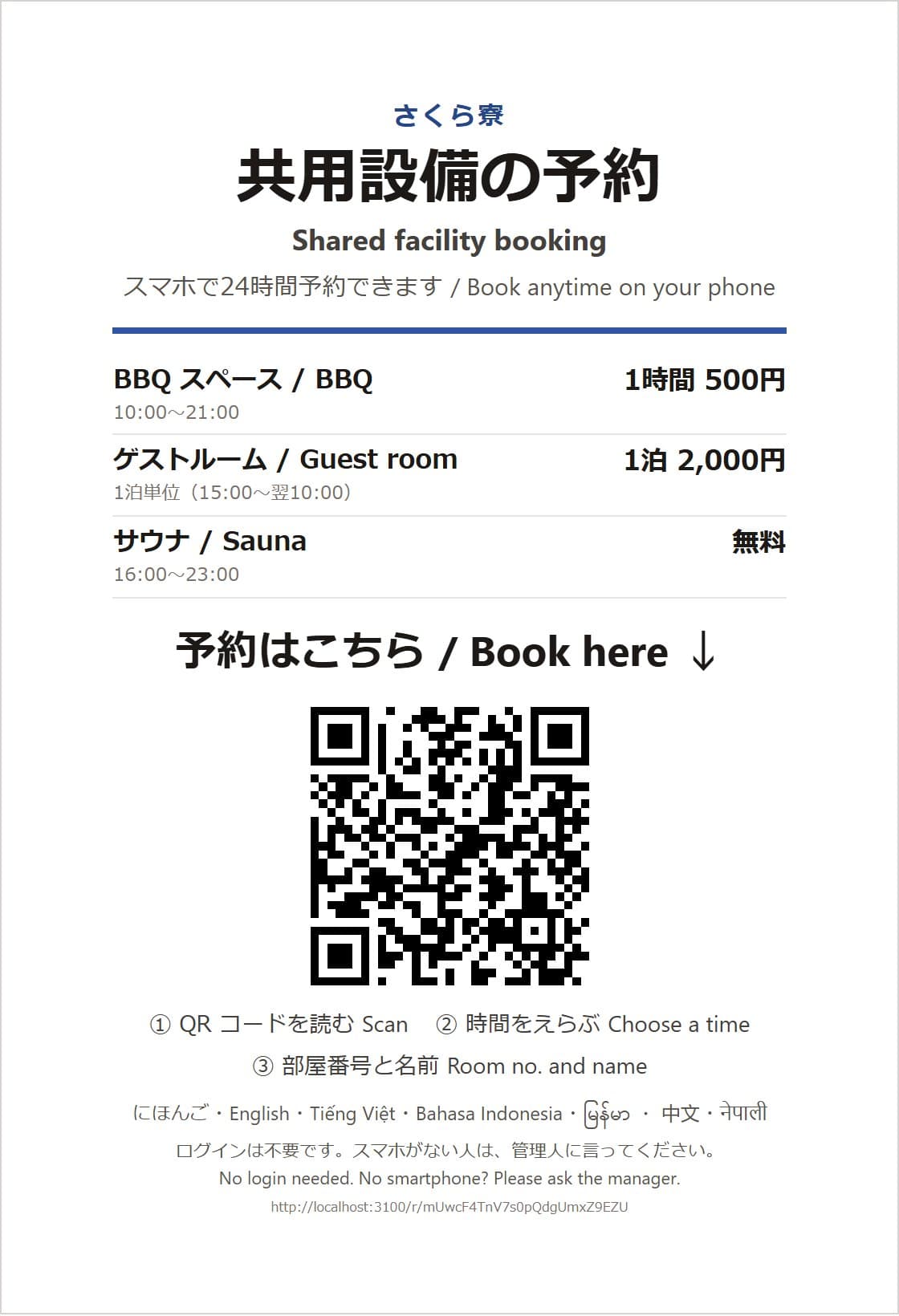

Scan the QR code posted at the property with the phone's camera
The booking page opens in the phone's language. No login or app needed.
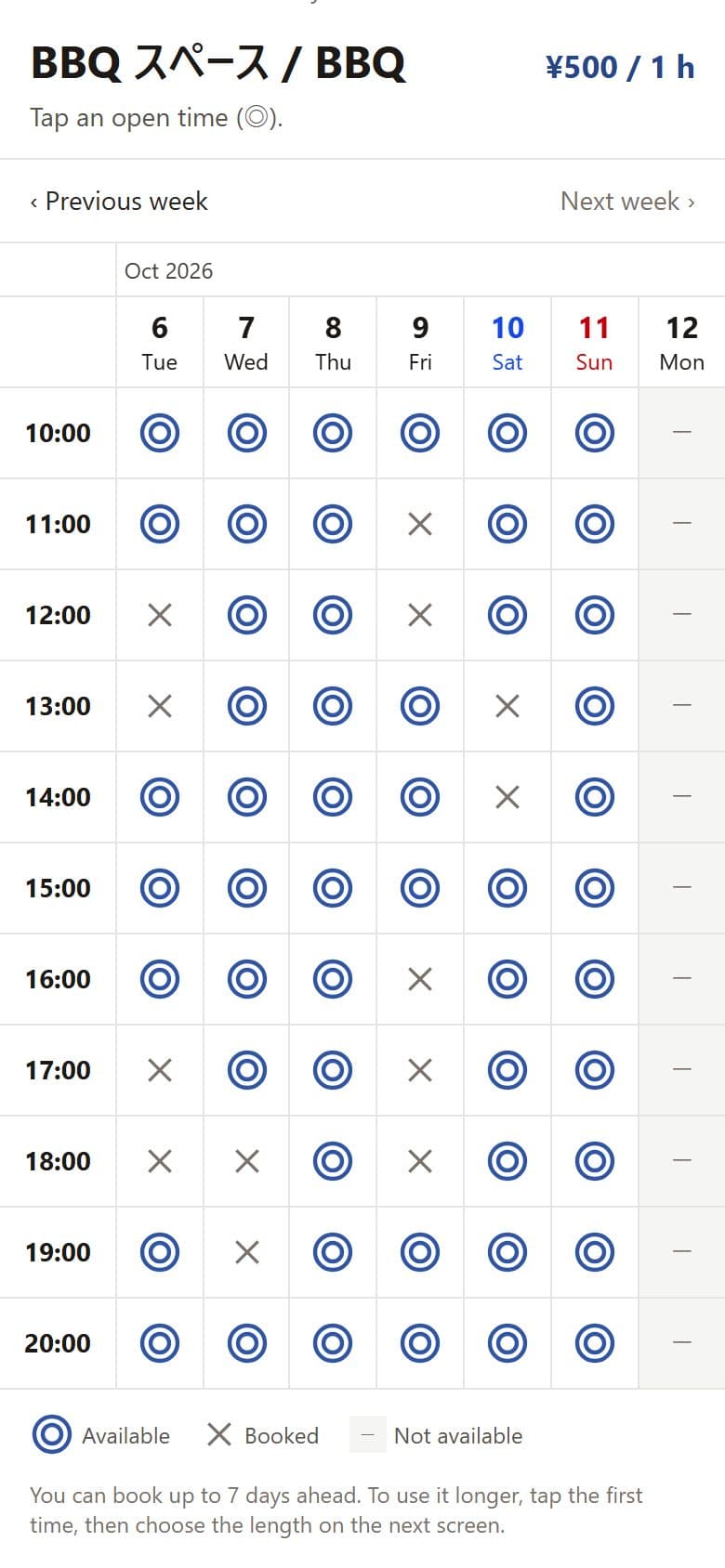
1Tap ◎
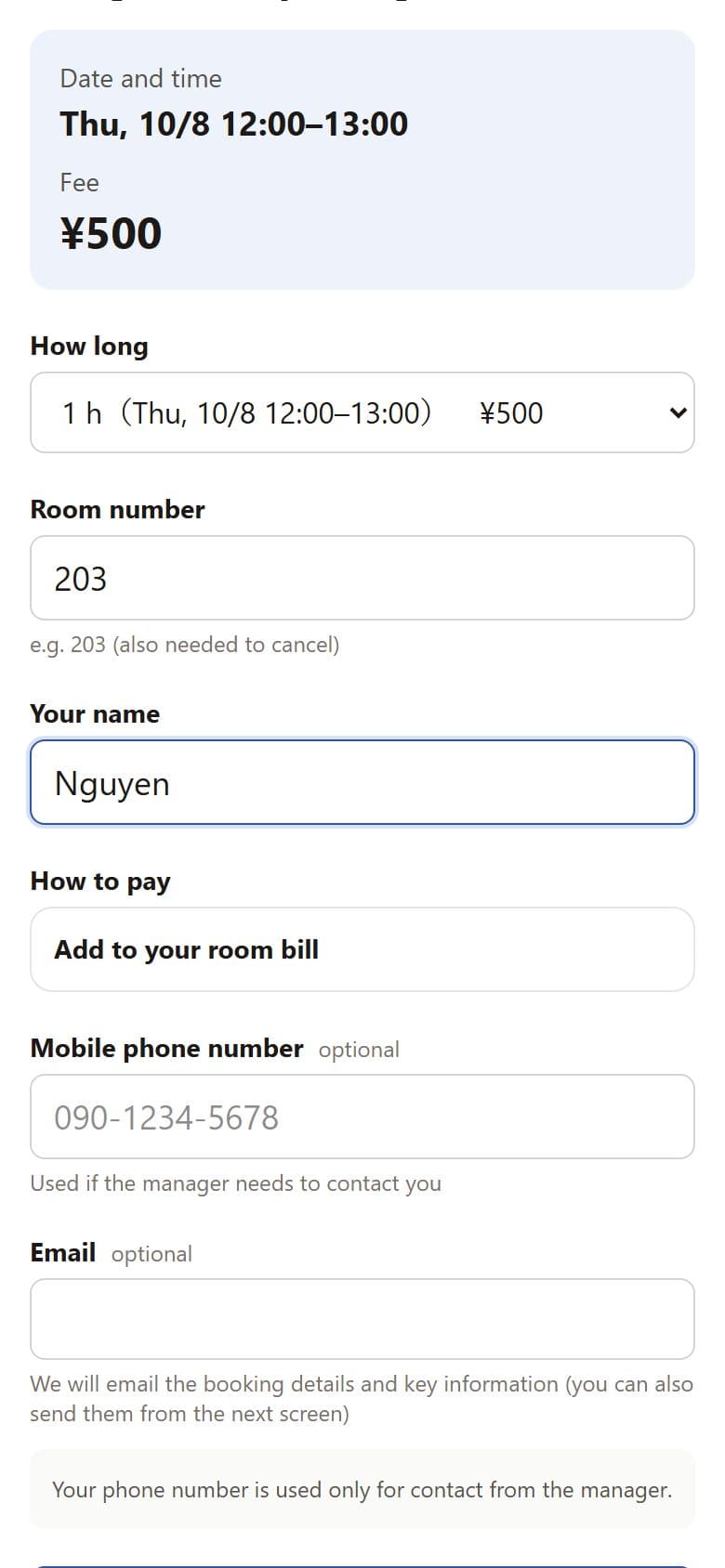
2Room number and name
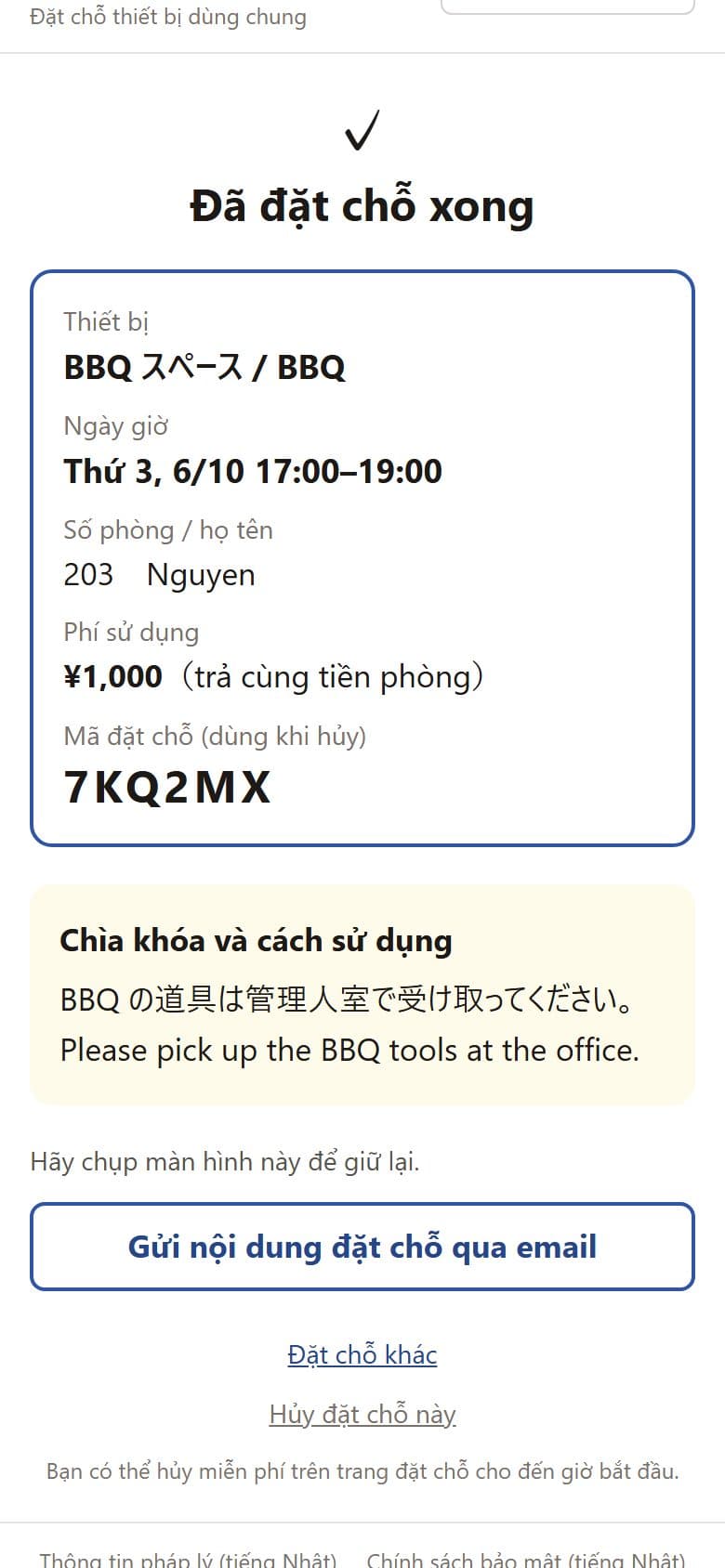
3Booked, with instructions
Email · now
【さくら寮】BBQ スペース Đã đặt chỗ tại さくら寮. Ngày giờ: T7, 10/10 17:00–19:00 Mã: 7KQ2MX ■ Chìa khóa và cách sử dụng Nhận dụng cụ BBQ ở phòng quản lý.
When a booking is complete, the page shows the date and time, booking code and instructions, and an email is sent in the language the resident or guest chose (email address optional; it can also be added on the confirmation page). Write your own notes in the admin console, such as "Pick up BBQ tools at the office" or "Sauna closes at 9 PM".
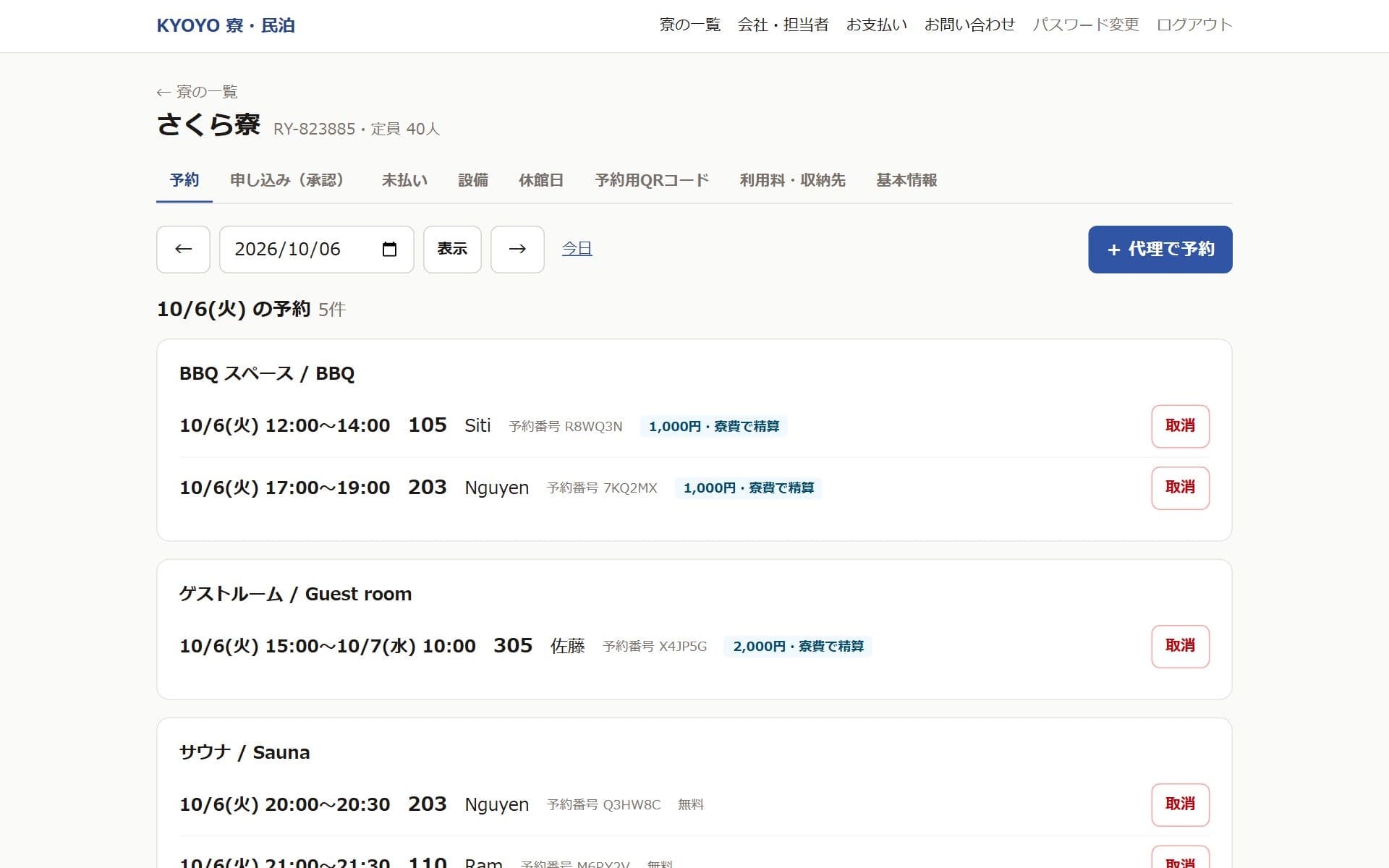
Operators and hosts need just this one screen
See today's bookings, guest room requests awaiting approval and usage fees at a glance. Manage multiple dormitories and properties with one account.
- 7 languages (switch automatically)
- Weekly table shows availability at a glance
- Per-room daily booking limits
- Approval option for guest rooms
- Settle with rent, cash, or online payment (Japan only)
- Print a sign to post (Japanese & English)
- No double bookings
- Multiple properties in one account
Simple, flat pricing
Per property (one dormitory or building), excluding tax. The same price regardless of the number of residents, guests or bookings
Monthly
$29/month
Cancel anytime
Yearly
$290/year
Save $58 compared with monthly
- ✓ No setup fee. The first 30 days are free
- ✓ Unlimited residents, guests, facilities, bookings and team members
- ✓ Pay by card (operators in Japan can also pay by invoice / bank transfer)
- ✓ Booking emails in 7 languages at no extra cost
- ✓ Usage fees can be settled with rent (record only) or paid in cash on site. Online payment is Japan only (its payment fee is paid by the residents or guests who choose it)
Prices exclude tax; any applicable local taxes are the customer's responsibility. For business customers only.
Operating in Japan? You can choose JPY billing instead: ¥3,480/month or ¥34,800/year per property, including Japanese consumption tax (pricing in Japanese).
Frequently asked questions
Can I use it for room (lodging) reservations at a vacation rental?
No. KYOYO Stay is a service for booking shared facilities (guest rooms, meeting rooms, BBQ areas, saunas, parking, etc.) used by people who live in or stay at dormitories, vacation rentals and similar properties. We do not accept or broker room or lodging reservations, and we do not recruit guests. Please continue to handle lodging reservations, guest registers and ID checks in your own way.
What kinds of facilities is it suited for?
Facilities that are booked for a set time, such as guest rooms, meeting rooms, BBQ areas, saunas, parking, study rooms, music rooms, theater rooms and private kitchen use. Short 15- and 30-minute slots are also available, so it also works for taking turns with laundry and showers at busy times.
Which languages are supported?
Seven: にほんご
Can I try it before signing up?
Yes. With "Try the demo", you can try the real admin console and the resident and guest screens without signing up. The resident and guest screens can be switched between 7 languages. You can also scan the QR code on the sample sign with your own phone and make a booking.
Can share houses use it for common spaces?
Yes. It suits spaces used for a set time, such as private use of the kitchen or living room, theater rooms, workspaces and visitor parking. Residents don't need to be registered, so there is no extra work each time someone moves in or out.
Do residents and guests need to register, or do we need a resident list?
No. They just scan the QR code posted at the property and enter their room number and name. There is no need to re-register at every move-in, move-out, check-in or check-out.
What counts as one "property"?
One dormitory or one building counts as one property. The flat fee per property does not depend on the number of shared facilities, bookings, residents, guests or team members.
How are usage fees collected?
Free facilities can be used as they are. For paid facilities, choose per property from "Settle with rent" and "Cash on site", plus "Online payment" for operators in Japan (residents and guests see only the options you choose). "Settle with rent" only records usage, and you can export monthly per-room totals as CSV.
Do operators and hosts pay the online payment fee? (Japan only)
No. Online payment of usage fees (cards, Apple Pay, Google Pay, etc.) is available only to operators in Japan. Only the residents and guests who choose it pay an online payment service fee (4.0% of the usage fee + ¥20), and the full usage fee is paid into the operator's or host's account. You don't need to change your facility fees.
Can it be used in dormitories for foreign workers?
Yes. In Japan, housing costs for Technical Intern Training and Specified Skilled Worker residents are subject to rules, such as not exceeding actual costs and explaining charges in advance. If you charge separately for shared facilities, please check with your supervising organization, registered support organization or a professional. Many dormitories use it free of charge just to manage turns. Outside Japan, please follow your local rules.
What about residents or guests without a smartphone?
Managers and hosts can book on their behalf from the admin console. Phone numbers and email addresses are optional.
Can we pay by invoice?
Operators in Japan billed in JPY can pay by card or by invoice (bank transfer). Operators outside Japan pay by card in USD. Yearly billing ($290 per property) is also available.
Guides to running shared facilities
Practical guides for dormitories, vacation rentals and share houses: setting booking rules, house rule templates, collecting usage fees and more.
- How-toManaging Shared Facility Bookings in Employee and Student Dormitories: Rules and Steps for Guest Rooms and Meeting Rooms
- How-toHow to Run Dormitory Laundry and Shower Queues with Bookings: Less Crowding and Fewer Late-Night Problems
- RulesBooking Shared Facilities (BBQ, Sauna) at Vacation Rentals and Guesthouses, with a House Rules Template
- ComparisonManaging Common Space Bookings in Share Houses: Rules That Prevent Conflicts and How to Choose a Tool
- PricingHow to Set and Collect Usage Fees for Shared Facilities in Dormitories and Vacation Rentals: Settle with Rent, Online Payment, or Cash
Every facility that needs booking, with one QR code
Residents and guests: please book from the QR code posted at your property.